> For the complete documentation index, see [llms.txt](https://docs.wproofreader.com/llms.txt). Markdown versions of documentation pages are available by appending `.md` to page URLs; this page is available as [Markdown](https://docs.wproofreader.com/v6.10.0.0/deployment/installation-requirements/architecture-diagram.md).

# Architecture diagram

WebSpellChecker/WProofreader is a web-based application. Thus, it requires a properly configured web server for static files (web content) processing. Check [Software requirements](/v6.10.0.0/deployment/installation-requirements/software-requirements.md) to find more about the supported web servers.

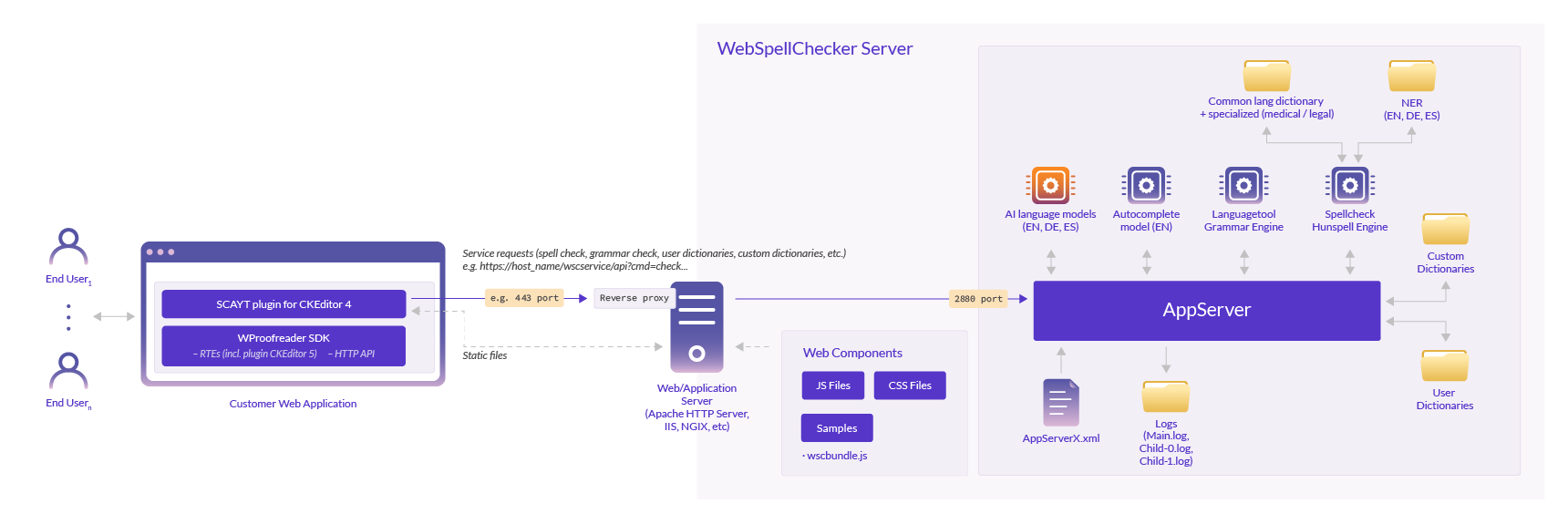
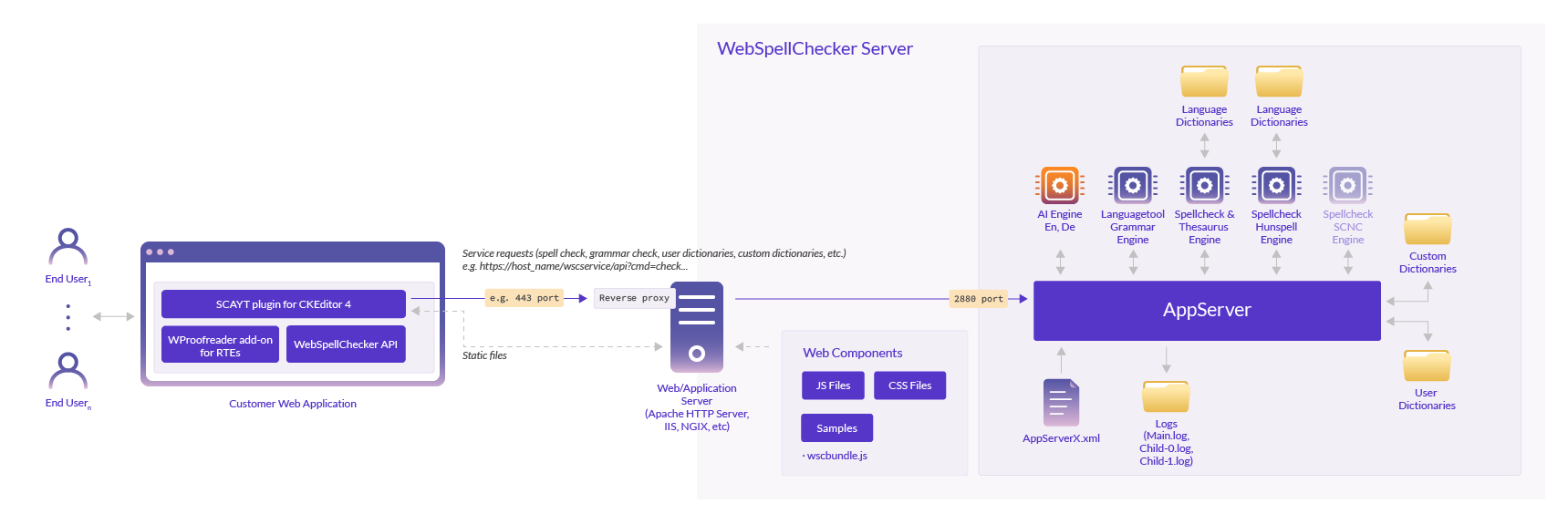
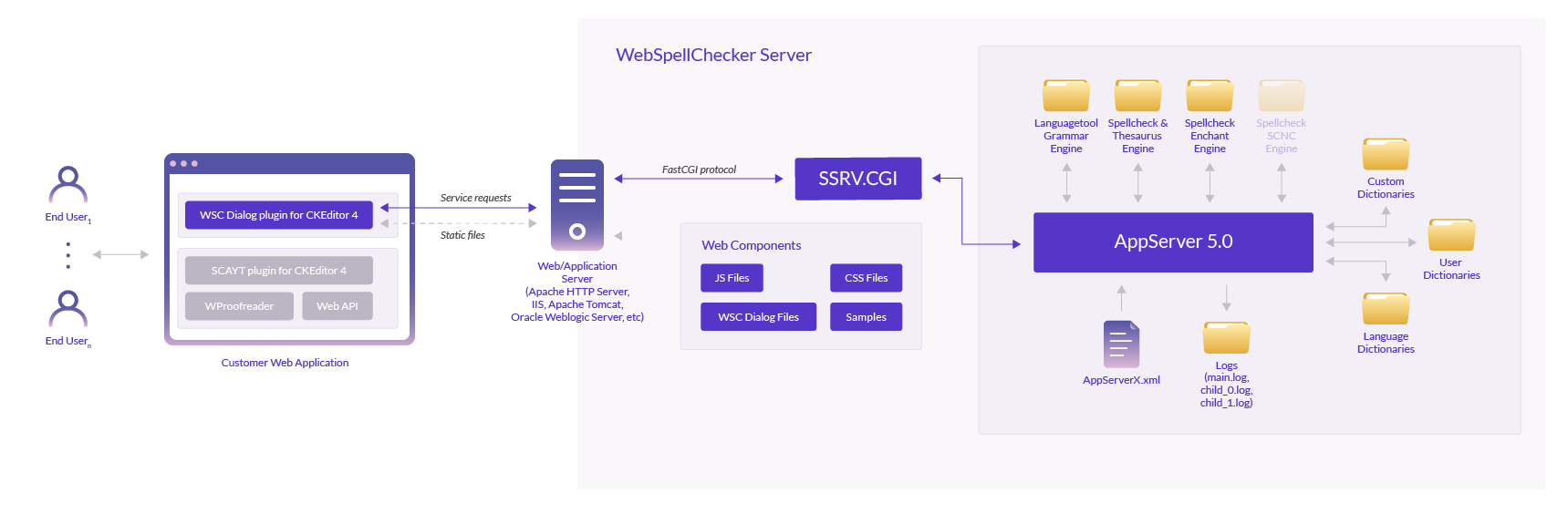
The diagrams below illustrate three scenarios on how the server-based version of the app communicates with the customer's web app.

### Scenario A. Single entry point for service requests and static files via web server (default and recommended) <a href="#architecturediagram-scenarioa.singleentrypointforservicerequestsandstaticfilesviawebserver-defaultan" id="architecturediagram-scenarioa.singleentrypointforservicerequestsandstaticfilesviawebserver-defaultan"></a>

<figure><img src="/files/Gh4AFUWIlPgoWWoySlqk" alt=""><figcaption></figcaption></figure>

### Scenario B. AppServer processes service requests directly via 2880 port and static files via web server (outdated) <a href="#architecturediagram-scenariob.appserverprocessesservicerequestsdirectlyvia2880portandstaticfilesviaw" id="architecturediagram-scenariob.appserverprocessesservicerequestsdirectlyvia2880portandstaticfilesviaw"></a>

<figure><img src="/files/esz93y5f0Vq175d8scsE" alt=""><figcaption></figcaption></figure>

### Scenario C.  A single entry point FastCGI proxies service requests before AppServer (outdated and deprecated) <a href="#architecturediagram-scenarioc.asingleentrypointfastcgiproxiesservicerequestsbeforeappserver-outdated" id="architecturediagram-scenarioc.asingleentrypointfastcgiproxiesservicerequestsbeforeappserver-outdated"></a>

<figure><img src="/files/RQuojSJnW6fT3sq61P6N" alt=""><figcaption></figcaption></figure>

#### Legend <a href="#architecturediagram-legend" id="architecturediagram-legend"></a>

| <p><strong>Administrator</strong> is an administrator of both the WebSpellChecker application and a customer's web application. Administrator can perform or manage the following actions:</p><ul><li>Install and configure application on the server;</li><li>Activate the application license;</li><li>Customize and adjust the default settings to meet end users' and business needs;</li><li>Create custom wordlists with specific terms to extend the default dictionaries (company and user-level custom dictionaries);</li><li>Monitor the application performance and troubleshoot issues.</li></ul> |
| ------------------------------------------------------------------------------------------------------------------------------------------------------------------------------------------------------------------------------------------------------------------------------------------------------------------------------------------------------------------------------------------------------------------------------------------------------------------------------------------------------------------------------------------------------------------------------------------------------------- |
| <p><strong>End user</strong> is a user of a customer web application. End user can perform the following actions (within the scope of the application functionality):</p><ul><li>Send input text for checking;</li><li>See and correct detected errors with suggested corrections;</li><li>Ignore suggestions;</li><li>Add words to a dictionary called “user custom dictionary”;</li><li>Change a language for text checking. <a href="/pages/GUZ6cksYHij4R1JW5Nhz">Supported languages</a>;</li><li>Make changes to other settings available on UI.</li></ul>                                               |
| **Customer web application(s)** where text checking functionality is required and will be used.                                                                                                                                                                                                                                                                                                                                                                                                                                                                                                               |
| **FastCGI** is a binary protocol for interfacing interactive programs with a web server. It is aimed at reducing the overhead associated with interfacing the web server and CGI programs, allowing a server to handle more web page requests at once. For proper work of the application components, the FastCGI module must be enabled for a chosen web server.                                                                                                                                                                                                                                             |
| **WebSpellChecker Server**                                                                                                                                                                                                                                                                                                                                                                                                                                                                                                                                                                                    |
| **Web components** is a set of various static files (web content) that are required for the application functioning. All these files are shipped with the standard package and installed automatically. These are JavaScript, CSS, HTML files.                                                                                                                                                                                                                                                                                                                                                                |
| **AppServer 5.0** is an application server that is responsible for combining all the components of the system together to provide multi-language text checking functionality.                                                                                                                                                                                                                                                                                                                                                                                                                                 |
| **Engines** include a list of integrated engines that are responsible for different types of text checking (like spelling, grammar, etc.). These engines are shipped with the default installation package.                                                                                                                                                                                                                                                                                                                                                                                                   |
| <p><strong>Dictionaries</strong> combine a list of various types of dictionaries either shipped with the package or created during the application operation and use. </p><p>There are three main categories of dictionaries available:</p><ul><li>default or common language dictionaries,</li><li>company-level custom dictionaries,</li><li>user-level custom dictionaries.</li></ul>                                                                                                                                                                                                                      |
| <p><strong>AppServerX.xml</strong> is a configuration file that contains a list of settings for the application configuration. You can find a detailed description of all available</p><p>parameters in the <a href="/pages/VWramb6Y9m1TkWhRNn4y">AppServer parameters</a> guide</p>                                                                                                                                                                                                                                                                                                                          |
| **Logs** is a folder with log files that keeps a registry of events, processes, and messages that occur within the application.                                                                                                                                                                                                                                                                                                                                                                                                                                                                               |


---

# Agent Instructions
This documentation is published with GitBook. GitBook is the documentation platform designed so that both humans and AI agents can read, navigate, and reason over technical content effectively. Learn more at gitbook.com.

## Querying This Documentation
If you need additional information that is not directly available in this page, you can query the documentation dynamically by asking a question.

Perform an HTTP GET request on the current page URL with the `ask` query parameter, and the optional `goal` query parameter:

```
GET https://docs.wproofreader.com/v6.10.0.0/deployment/installation-requirements/architecture-diagram.md?ask=<question>&goal=<endgoal>
```

`ask` is the immediate question: it should be specific, self-contained, and written in natural language.
`goal` is optional and describes the broader end goal you are ultimately trying to accomplish on behalf of the user. GitBook uses it to tailor the answer towards what is most useful for that goal.

The response will contain a direct answer to the question and relevant excerpts and sources from the documentation.

Use this mechanism when the answer is not explicitly present in the current page, you need clarification or additional context, or you want to retrieve related documentation sections.